See where any X account posts from, without leaving your feed
- Browser extension
- TypeScript
- Side project
- Playwright
- SQLite
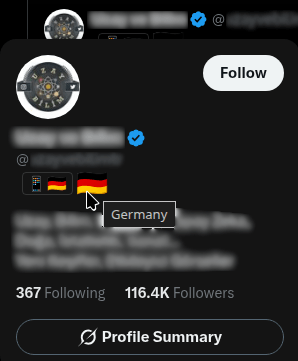
Someone is explaining your country to you. Confidently, at length, with the tone of a person who has been to every street they’re describing. You click the profile out of irritation, dig into “About this account,” and they’ve never been within five thousand miles of it.
That’s the whole reason this exists. X already knows the answer and already shows it, just two clicks deep on a page you have to open, which is two clicks more than anyone spends mid-scroll. So I moved it into the hover card.
X Profile Location is a browser extension. Hover any profile and a country flag appears in the card. The data isn’t scraped or inferred, it comes from X’s own location API, the same one behind the “About this account” panel you’d have opened anyway.
What the flag is actually good for
A flag isn’t a verdict. Plenty of people write about places they don’t live, and a few of them know the place better than the locals do. It’s one more fact on the screen. It just happens to be the one that ends a lot of arguments fast.
Standing is the easy case. When an account is instructing you about a city’s policy, whether they live there is relevant, and until now you had to go looking for it.
Then there’s money, which I hadn’t really thought about until the flags started showing me it. X pays out on engagement, and a payout that’s a rounding error in San Francisco is a real wage in a lot of the world. That gap is the entire business model for a certain kind of account: adopt an American identity, pick a US political fight, post the most inflammatory version of whichever opinion is already winning, then farm the replies. The flag doesn’t prove bad faith. It does tell you the account posting furiously about a town in Ohio was created through a different country’s App Store, and you can draw your own conclusions.
That last detail comes free, by the way. X returns the app store the account signed up through, so a 📱 🇯🇵 means the account was created through the Japanese App Store whatever the profile says now.
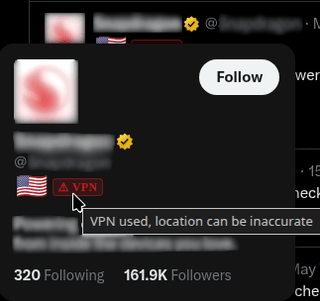
There’s a VPN badge too, shown when X itself marks the location as possibly inaccurate. That’s not me second-guessing anything, it’s a field X returns. It’s my favourite part of the whole thing. You’d be surprised how often the flag says one thing and the little warning triangle quietly disagrees.
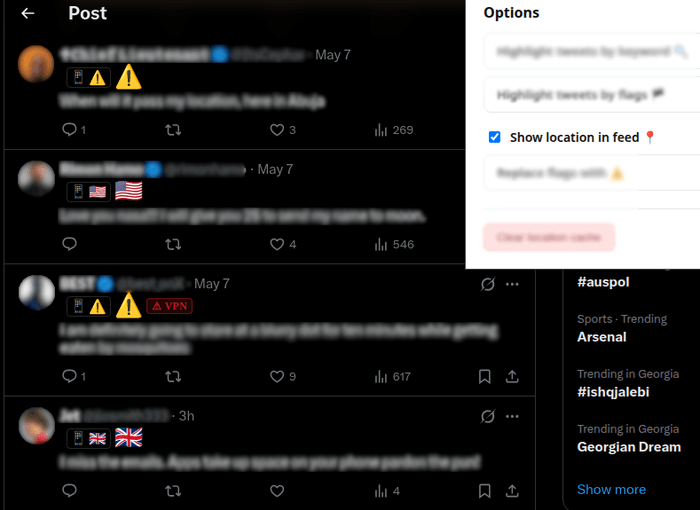
The options page handles the rest: highlight accounts by keyword, show flags inline in the feed instead of only on hover, or collapse tweets from locations you’d rather not read. All of it opt-in, all of it in chrome.storage.
Borrowing your own headers
Here’s the part that was genuinely fun to build.
The endpoint is AboutAccountQuery, and it’s authenticated. Not with an API key I could ship, but with the headers X’s own web app sends: a bearer token and a CSRF token that rotate.
So I don’t forge anything. I borrow. While you browse X, your logged-in session is already making authenticated calls all day. The extension watches them go past, lifts the headers, and reuses them to ask X one extra question. Your session, your headers, one more query.
Doing that needs two scripts living in different worlds:
Page context (world: MAIN)        Content script            IndexedDB
──────────────────────────        ──────────────            ─────────
page-script.ts                    content.tsx
  wraps fetch / XHR        ──▶     captures headers
  reads timeline JSON      ──▶     fetches location on hover
                                   injects the flag
                                   caches it for 30 days
A content script runs in an isolated context, so it can’t see or wrap the page’s own fetch and XMLHttpRequest. For that you have to inject into the page’s actual JavaScript context (world: MAIN). That injected script does the intercepting and passes what it finds back over custom DOM events.
Bios ride along for nothing. The timeline responses already contain them, so the extension reads them out of data it’s watching anyway rather than asking for anything extra.
The part that was actually hard: 50 requests, 15 minutes
I measured it live. Fifty lookups per fifteen minutes, per user, on that endpoint. X is decent about it and returns x-rate-limit-remaining and x-rate-limit-reset on every response, not just the 429s, so at least you always know where you stand.
Fifty is not many. One scroll through a busy feed puts more than fifty accounts on your screen. Any version of this extension that eagerly looks up everything it sees is rate-limited inside a minute and then shows you nothing for the next fourteen, which is worse than not having it.
So the default is hover. You spend a lookup on the account you stopped for, which is the one you cared about.
There’s a background prefetcher for the rest, and most of its design is about restraint. It takes at most 70% of the window and leaves the remainder for your hovers. It won’t spend that share in one burst either: before each lookup it recomputes the gap as time left in the window divided by budget left, which lands around 26 seconds, and that number is self-correcting. Hover a lot and you eat into the shared budget, so the gap stretches. Sit still and it tightens again. Candidates sit in two queues, the feed you’re actually scrolling drains before a thread’s replies, most-followed first within each.
The thing I got wrong at first was treating this as a caching problem. Caching doesn’t help you the first time you see an account, and on a feed of strangers it’s always the first time. It’s a scheduling problem. You have fifty tokens and fifteen minutes and you have to decide who’s worth one.
Which is why there’s a server now
The other way to spend fewer tokens is to not be the first person to look someone up.
Your first lookup of an account is somebody else’s fifth. So there’s a small shared cache: clients that have already paid for an AboutAccountQuery contribute the result, and everyone else reads it and skips the call. It started as a Cloudflare Worker with D1 behind it and now runs as Node and SQLite on a small VPS, from the same request handlers either way.
This did mean rewriting the privacy section of my own README. Three fields go up: the location, the source, and X’s accuracy flag. Those are the only things that cost a rate-limited call, so they’re the only things worth sharing. Bios and display names stay put because the timeline already hands those to every client for free. Contributions carry a random per-install id, which exists so one client can’t stuff the same vote repeatedly. Lookups carry no id at all and are sent with credentials: 'omit'. The server never learns who looked up whom, and it never talks to X.
It’s also strictly optional, in the boring engineering sense as much as the consent one. Every call has a five second timeout, a circuit breaker backs off after three consecutive failures, and every failure path returns “no data” so the extension falls through to asking X directly. If the server is down you get the original behaviour and no error. It’s on by default, and it’s one checkbox to turn off.
Testing a site that doesn’t want to be tested
I’m injecting into a DOM I don’t own and reading a private API. Neither of those ships a changelog. X tweaks its markup, a selector stops matching, and a flag silently stops appearing.
So a MutationObserver re-checks as the page changes, and the selectors are loose enough to survive small edits. The real safety net is Playwright driving a real browser against real X markup, and that one fought back. X blocks Playwright’s bundled Chromium, so the suite runs a real Brave profile I logged into by hand once. CI can’t spend the rate limit on every push either, so the tests record X’s actual responses once and replay them after that.
I’d love to tell you it never breaks. It breaks. The tests just mean I find out before you do.
Try it
If you spend real time on X, the flags stop registering as a feature after about a day and just become part of the feed. I only notice mine now when I’m on a machine that doesn’t have it.
- Install it: X Profile Location on the Chrome Web Store
- Have a look first: x-pat.pages.dev
Free, and staying that way. If X breaks a selector and a flag goes missing, tell me, that’s the report that keeps it working.
Comments
Sign in with GitHub to leave one. Threads are public GitHub Discussions - you can read and reply from there instead.
Loading comments…